
 +91-22-48913909
How to Add Biller for SIP Transactions in Yes Bank?
SIP or Systematic Investment plan is an investment mode in Mutual Funds where people invest in small amounts at regular intervals. People can plan for various objectives such as higher education, purchasing a house, purchasing a vehicle, and so on. When it comes to SIP payments, with the advancements in technology people can make their investment through Net Banking easily. In case of Net Banking, individuals just need to add the Unique Registration Number or URN which they receive after making the initial transaction. Once the transaction is done.
This URN number is to be added to the net banking account by adding a biller so that the SIP payment process gets automated. It also makes the process of SIP payment hassle-free. However, the process of adding biller is different in case of each Bank. So, let us see the steps that describe how to add biller for SIP transactions in case of Yes Bank.
Log in, Click on Bill Pay & Select Add Biller
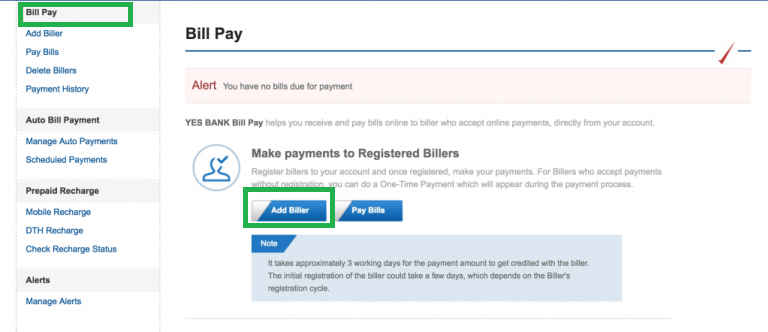
The first step always begins with logging onto the website of the bank. Here, you will log in with your valid credentials. Once you log in and reach your home page, check for Bill Pay option on the left side of your screen. If you click on it, you can see the screen display as and Pay Bills. Here you need to select the Add Biller option. The image for this step is given below as follows where Bill Pay and Add Biller options are highlighted in Green.
Select National and BSE Limited
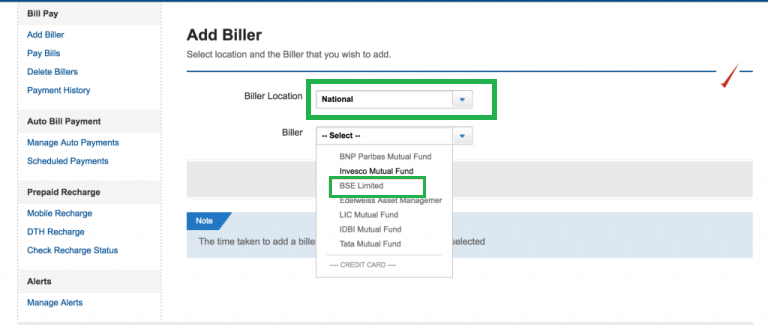
Once you click Add Biller option, a new screen opens up which has two elements Biller Location and Biller. In the drop-down next to Biller Location you need to select National option and in the drop-down next to Biller you need to select BSE Limited option. The image for this step is below where both the dropdowns for Biller Location and Biller are highlighted in Green.
Add URN and Fill Other Components
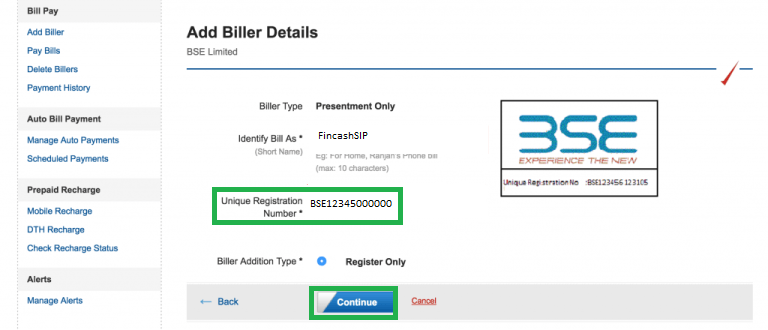
This is an important step in the biller addition process for SIP transaction in Yes Bank. Here, the individuals need to enter the URN which they have received in your email. If you do not receive the URN then, you can get the same from the website of www.fincash.com by visiting the My SIPs Section. Individuals should make sure that they do enter the correct URN number. In addition, they also need to enter other components as given on the page. Once they fill all the components, they need to click on Continue. The image for this step is given below where the URN and Continue options are highlighted in Green.
URN Confirmation
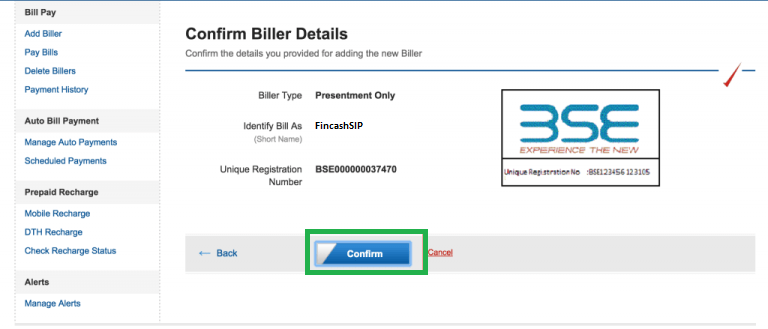
Once you click on Continue, a new screen pops up which shows the information you have filled. You can cross verify your information here and in case of any changes, go back to the previous screen. If all the data entered is correct; you can click on Confirm. The image given below represents this step where the Confirm button is highlighted in Green.
Confirmation Success
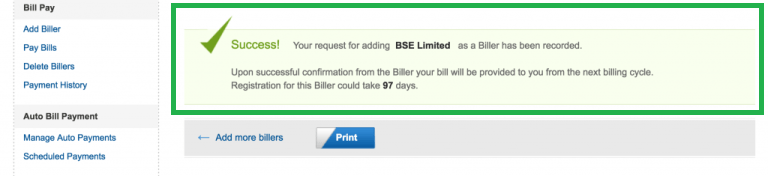
This is the last step in the biller addition process of Yes Bank. Once you click on Confirm you get a screen stating that the biller addition process has been successful and your biller has been added. The image for this step is given below as follows where the Success Message is highlighted in Green.
Go to Add Biller and Click on Manage Auto Payments Tab
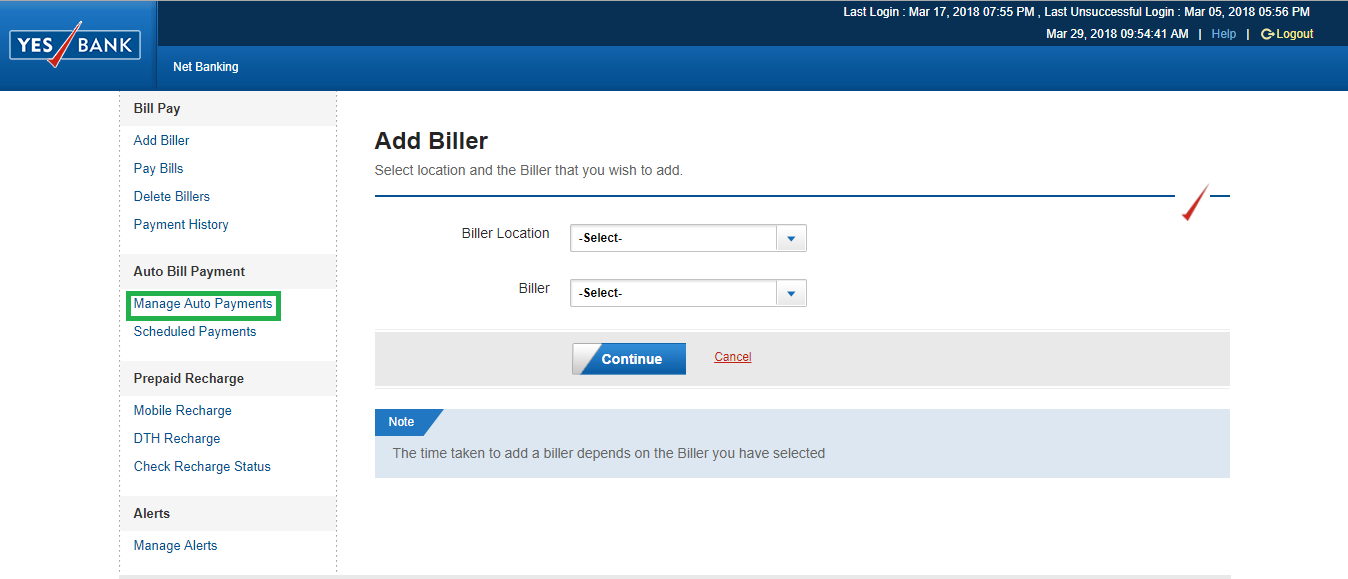
The registration process does not get completed by just registering the biller. After registering the biller, you need to set up the Auto Payment Process so that the SIP payments get automated. For setting up the process, you need to go to add billers section and click on Manage Auto Payments tab which is on the left side of the screen. The image for this step is given below where the Manage Auto Payments tab is highlighted in Green.
Click on Set Option Against URN Registered
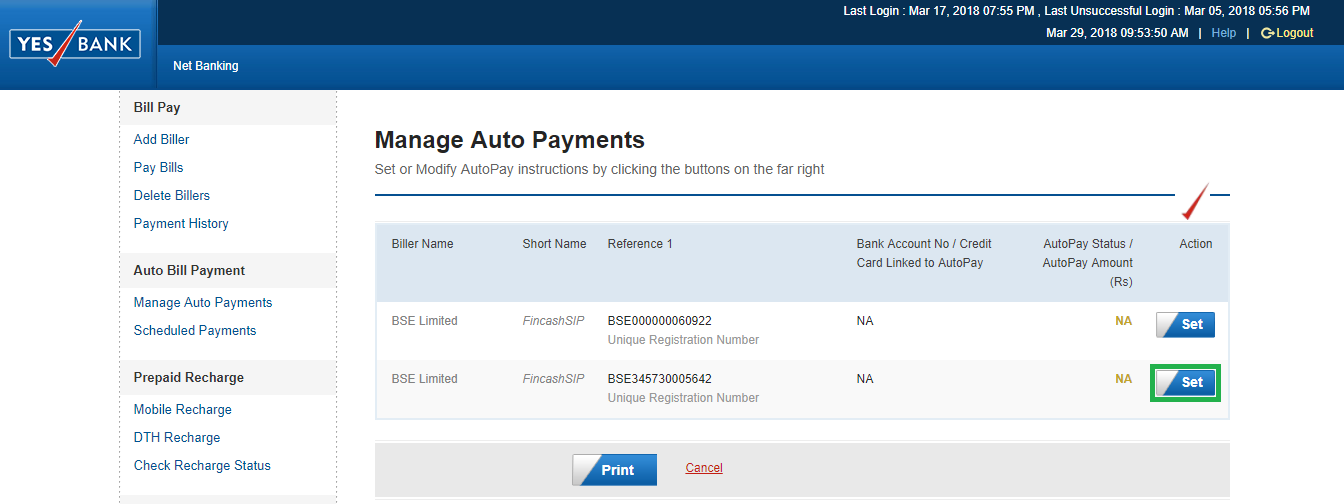
Once you click on Manage Auto Payments in the previous step, a new screen opens up. In this screen, you can find the URN of the SIP registered against which you need to click on the Set option. The image for this screen is given below where the Set option is highlighted in Green.
Set Payment Options
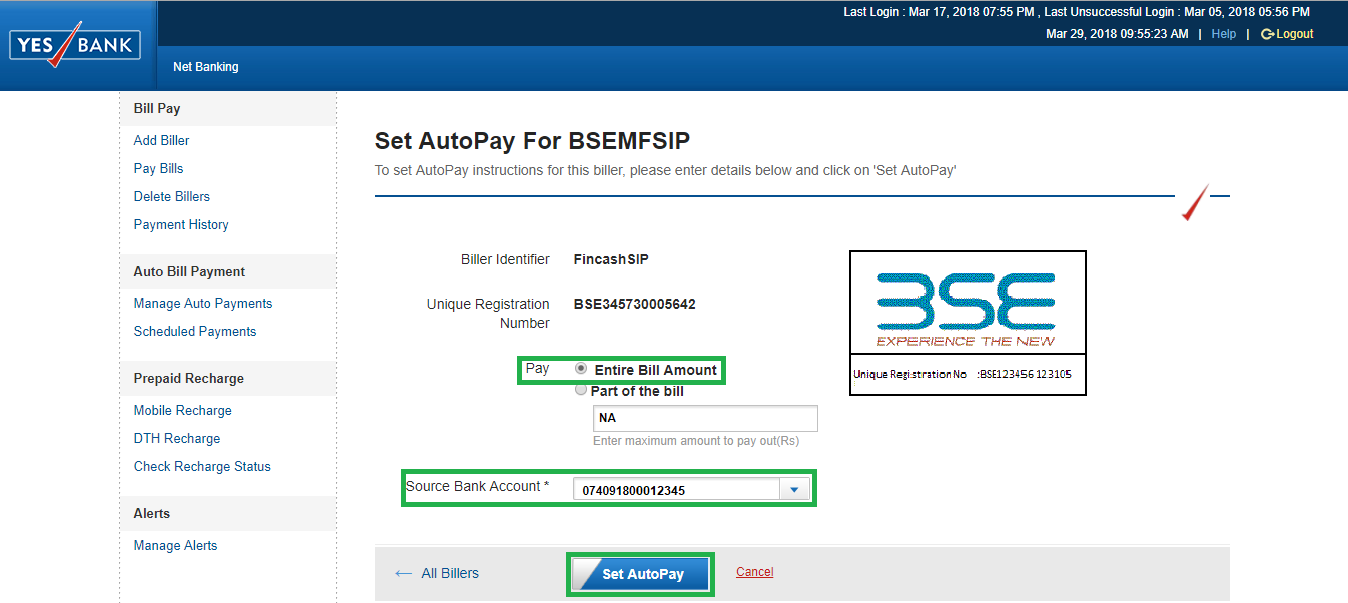
Once you click on Set, you are redirected to a new screen wherein; you need to enter the payment details. In this step, against Pay option, you need to select the Entire Bill Amount, select the bank account against which the SIP instalment will be deducted. After entering these details then you need to click on Set AutoPay option. The image for this step is given below where the Pay option, Source Bank Account, and Set AutoPay tab are highlighted in Green.
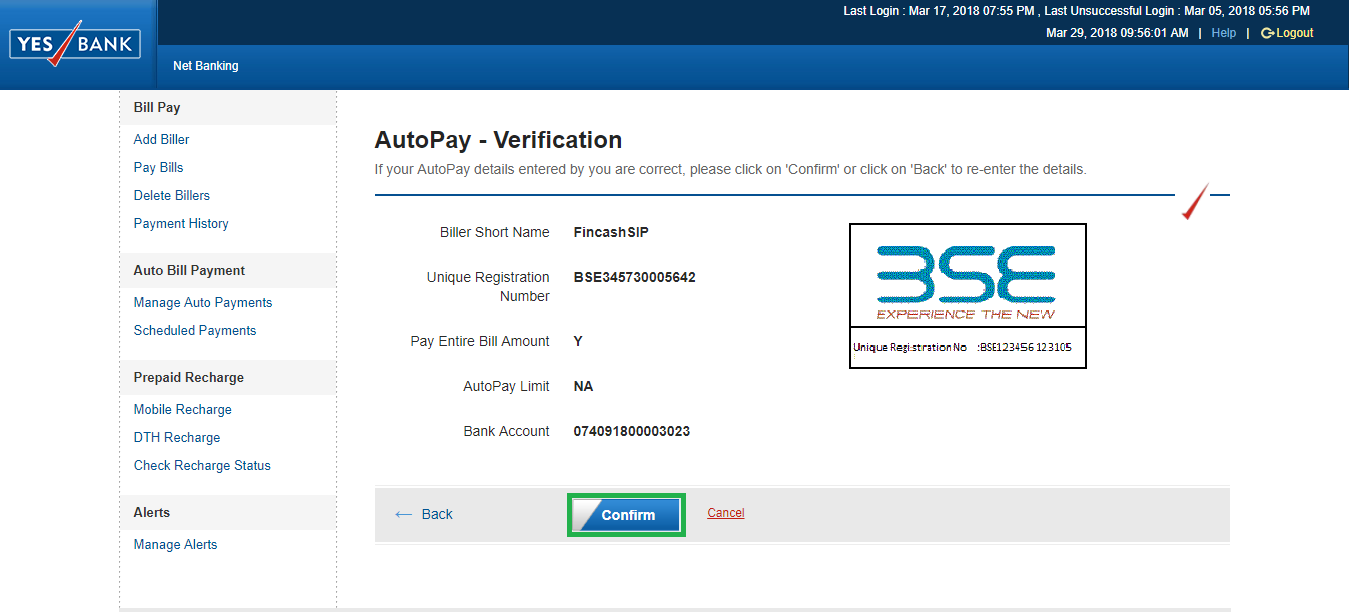
Verify & Confirm
Once you click on Set AutoPay option, a new screen opens up in which you can check the details and if all the details are correct then click on Confirm option. The image for this step is given below where the Confirm option is highlighted in Green.
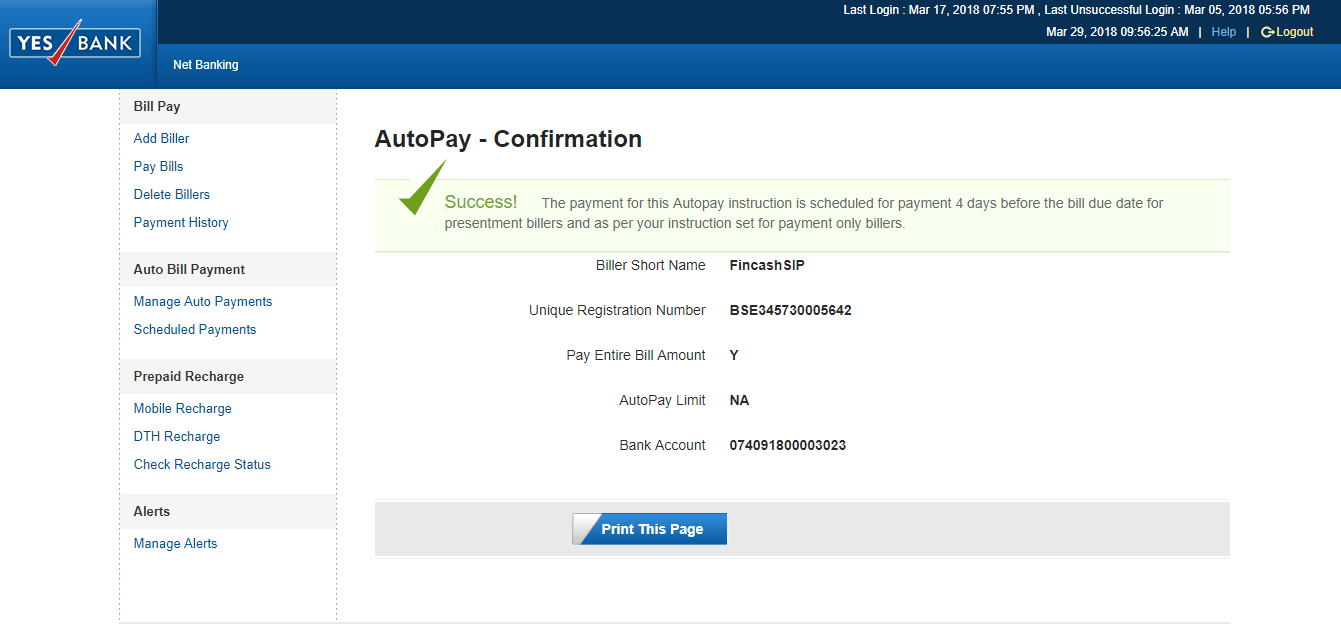
Final Registration
This is the last step wherein; once you click on Confirm, you can see the confirmation of AutoPay process. The image for this step is given below. Thus, the above five steps show that the process of Biller Addition is easy in case of Yes Bank.
Thus, the above ten steps show that the process of Biller Addition is easy in case of Yes Bank.
Fund Selection Methodology used to find 5 funds
Best SIPs to Invest to Earn Better Returns
Here are some of the recommend SIPs as per 5 year returns and AUM of more than INR 500 Cr
| Fund | NAV | Net Assets (Cr) | Min SIP Investment | 3 MO (%) | 6 MO (%) | 1 YR (%) | 3 YR (%) | 5 YR (%) | 2025 (%) | |
|---|---|---|---|---|---|---|---|---|---|---|
| DSP World Gold Fund Growth | ₹58.4551 ↓ -0.73 | ₹1,828 | 500 | 17 | -7.3 | 31.7 | 55.3 | 27.8 | 167.1 | |
| SBI Gold Fund Growth | ₹42.6 ↓ -0.10 | ₹17,647 | 500 | 3.4 | -2.4 | 17.6 | 34.4 | 24 | 71.5 | |
| Aditya Birla Sun Life Gold Fund Growth | ₹42.3173 ↓ -0.11 | ₹1,843 | 100 | 3.4 | -2.2 | 17.3 | 34.3 | 23.9 | 72 | |
| IDBI Gold Fund Growth | ₹37.5946 ↓ -0.26 | ₹858 | 500 | 2.8 | -2.3 | 16.5 | 33.9 | 23.9 | 79 | |
| HDFC Gold Fund Growth | ₹43.4292 ↓ -0.11 | ₹12,359 | 300 | 3.5 | -2.4 | 17.5 | 34.1 | 23.8 | 71.3 | |
| Note: Returns up to 1 year are on absolute basis & more than 1 year are on CAGR basis. as on 12 Oct 26 | ||||||||||
Research Highlights & Commentary of 5 Funds showcased
| Commentary | DSP World Gold Fund | SBI Gold Fund | Aditya Birla Sun Life Gold Fund | IDBI Gold Fund | HDFC Gold Fund |
|---|---|---|---|---|---|
| Point 1 | Bottom quartile AUM (₹1,828 Cr). | Highest AUM (₹17,647 Cr). | Lower mid AUM (₹1,843 Cr). | Bottom quartile AUM (₹858 Cr). | Upper mid AUM (₹12,359 Cr). |
| Point 2 | Oldest track record among peers (19 yrs). | Established history (15+ yrs). | Established history (14+ yrs). | Established history (14+ yrs). | Established history (14+ yrs). |
| Point 3 | Top rated. | Rating: 2★ (lower mid). | Rating: 3★ (upper mid). | Not Rated. | Rating: 1★ (bottom quartile). |
| Point 4 | Risk profile: High. | Risk profile: Moderately High. | Risk profile: Moderately High. | Risk profile: Moderately High. | Risk profile: Moderately High. |
| Point 5 | 5Y return: 27.76% (top quartile). | 5Y return: 24.02% (upper mid). | 5Y return: 23.86% (lower mid). | 5Y return: 23.85% (bottom quartile). | 5Y return: 23.84% (bottom quartile). |
| Point 6 | 3Y return: 55.28% (top quartile). | 3Y return: 34.42% (upper mid). | 3Y return: 34.34% (lower mid). | 3Y return: 33.91% (bottom quartile). | 3Y return: 34.09% (bottom quartile). |
| Point 7 | 1Y return: 31.69% (top quartile). | 1Y return: 17.58% (upper mid). | 1Y return: 17.32% (bottom quartile). | 1Y return: 16.45% (bottom quartile). | 1Y return: 17.51% (lower mid). |
| Point 8 | Alpha: 4.18 (top quartile). | 1M return: -3.30% (top quartile). | 1M return: -3.31% (upper mid). | 1M return: -3.50% (bottom quartile). | 1M return: -3.35% (lower mid). |
| Point 9 | Sharpe: 1.25 (bottom quartile). | Alpha: 0.00 (upper mid). | Alpha: 0.00 (lower mid). | Alpha: 0.00 (bottom quartile). | Alpha: 0.00 (bottom quartile). |
| Point 10 | Information ratio: -1.01 (bottom quartile). | Sharpe: 1.38 (top quartile). | Sharpe: 1.28 (bottom quartile). | Sharpe: 1.32 (lower mid). | Sharpe: 1.38 (upper mid). |
DSP World Gold Fund
- Bottom quartile AUM (₹1,828 Cr).
- Oldest track record among peers (19 yrs).
- Top rated.
- Risk profile: High.
- 5Y return: 27.76% (top quartile).
- 3Y return: 55.28% (top quartile).
- 1Y return: 31.69% (top quartile).
- Alpha: 4.18 (top quartile).
- Sharpe: 1.25 (bottom quartile).
- Information ratio: -1.01 (bottom quartile).
SBI Gold Fund
- Highest AUM (₹17,647 Cr).
- Established history (15+ yrs).
- Rating: 2★ (lower mid).
- Risk profile: Moderately High.
- 5Y return: 24.02% (upper mid).
- 3Y return: 34.42% (upper mid).
- 1Y return: 17.58% (upper mid).
- 1M return: -3.30% (top quartile).
- Alpha: 0.00 (upper mid).
- Sharpe: 1.38 (top quartile).
Aditya Birla Sun Life Gold Fund
- Lower mid AUM (₹1,843 Cr).
- Established history (14+ yrs).
- Rating: 3★ (upper mid).
- Risk profile: Moderately High.
- 5Y return: 23.86% (lower mid).
- 3Y return: 34.34% (lower mid).
- 1Y return: 17.32% (bottom quartile).
- 1M return: -3.31% (upper mid).
- Alpha: 0.00 (lower mid).
- Sharpe: 1.28 (bottom quartile).
IDBI Gold Fund
- Bottom quartile AUM (₹858 Cr).
- Established history (14+ yrs).
- Not Rated.
- Risk profile: Moderately High.
- 5Y return: 23.85% (bottom quartile).
- 3Y return: 33.91% (bottom quartile).
- 1Y return: 16.45% (bottom quartile).
- 1M return: -3.50% (bottom quartile).
- Alpha: 0.00 (bottom quartile).
- Sharpe: 1.32 (lower mid).
HDFC Gold Fund
- Upper mid AUM (₹12,359 Cr).
- Established history (14+ yrs).
- Rating: 1★ (bottom quartile).
- Risk profile: Moderately High.
- 5Y return: 23.84% (bottom quartile).
- 3Y return: 34.09% (bottom quartile).
- 1Y return: 17.51% (lower mid).
- 1M return: -3.35% (lower mid).
- Alpha: 0.00 (bottom quartile).
- Sharpe: 1.38 (upper mid).
All efforts have been made to ensure the information provided here is accurate. However, no guarantees are made regarding correctness of data. Please verify with scheme information document before making any investment.

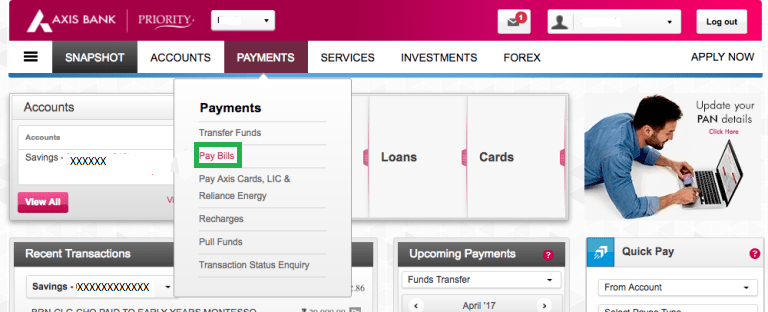
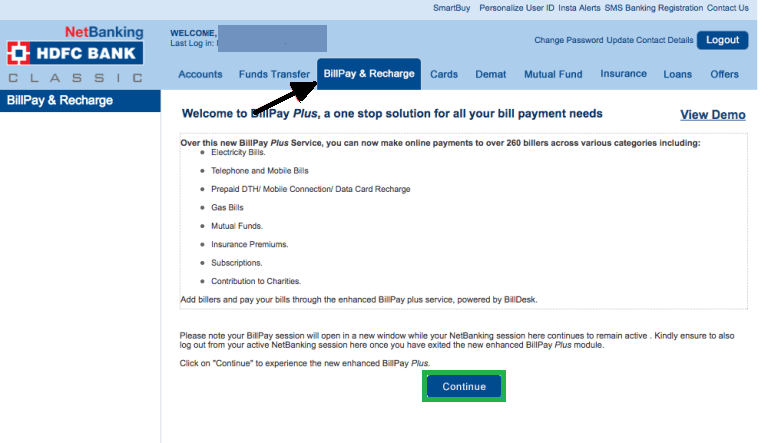



AMFI Registration No. 112358 | CIN: U74999MH2016PTC282153
Shepard Technologies Pvt. Ltd. (with ARN code 112358) makes no warranties or representations, express or implied, on products offered through the platform. It accepts no liability for any damages or losses, however caused, in connection with the use of, or on the reliance of its product or related services. Terms and conditions of the website are applicable.
©2026 Shepard Technologies Private Limited. All Rights Reserved