
 +91-22-48913909
How to Add Biller for SIP Transactions in Net Banking (All Banks Guide)
SIP (Systematic Investment plan) is a popular investment mode wherein individuals invest small amounts in mutual fund schemes at regular intervals.

It offers benefits such as rupee cost averaging, Power of Compounding, and disciplined Investing.
With advancements in digital banking, SIP payments can now be automated easily through Net Banking. To enable this, investors need to add a biller using their URN (Unique Registration Number).
Once the biller is successfully added, your SIP instalments are automatically debited from your Bank account, ensuring a smooth and hassle-free investment journey.
What is URN in SIP?
URN (Unique Registration Number) is generated after your first SIP transaction is completed.
You can:
- Receive it via email
- Or access it by logging into Fincash and visiting the My SIPs section
This URN is essential for linking your SIP with your bank account for autopay setup.
Biller Addition Process for ICICI Bank
In ICICI Bank, the process of adding a biller for SIP transactions is simple but requires careful selection of the correct biller option.
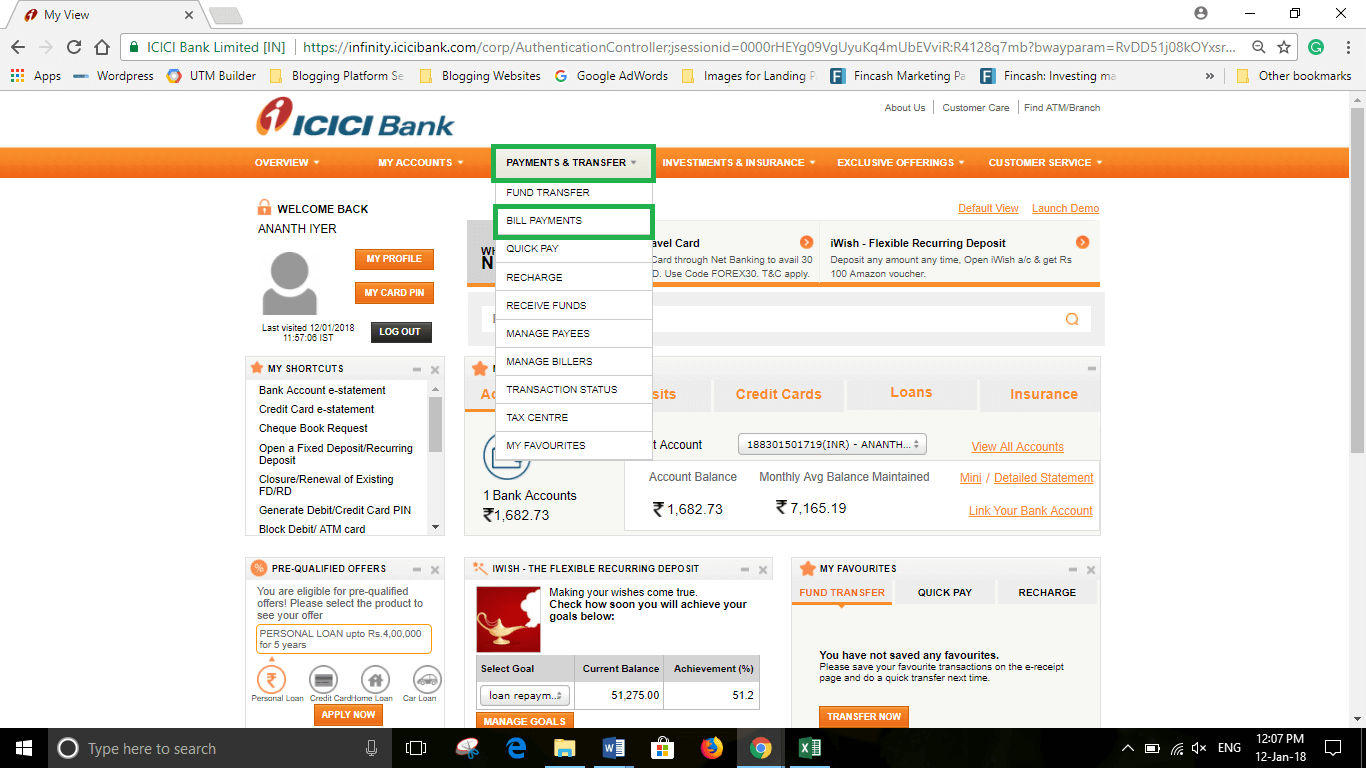
First, log in to your icici net banking account. Once logged in, navigate to the Payments & Transfer tab available on the dashboard.
Under this section, select the Mutual Fund option. After clicking on it, a new screen will open where you need to choose the Register option under the Pay New Bills section.
Next, in the list of billers, scroll and select BSE ISIP#. This is the correct biller for SIP transactions.
After selecting the biller, you will be prompted to enter your URN (Unique Registration Number) along with other relevant details.
Once you enter all the details correctly, click on Confirm. After confirmation, the biller gets successfully registered, and your SIP payments will be automated.
For a detailed step-by-step guide, read: How to Do SIP Through Net Banking on Fincash.com Using ICICI Bank?
Biller Addition Process for Axis Bank
For Axis Bank, the biller addition process involves multiple verification steps to ensure secure transactions.
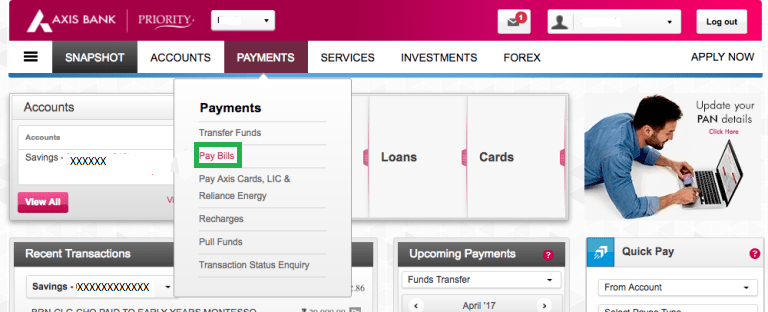
Begin by logging in to your Axis Bank Net Banking account. On the home screen, click on the Payments tab and select the Pay Bills option.
In the next screen, click on Add Biller. You will see various biller categories such as insurance, utilities, etc. From these options, select Mutual Funds.
Under Mutual Funds, choose BSE Limited as the biller.
Proceed to the next step where you will be required to enter your URN and other relevant details.
After entering the details, verify them carefully and proceed. You will then receive a NetSecure Code / OTP on your registered mobile number.
Enter the OTP to complete verification. Once verified, your biller will be successfully added, and SIP payments will be automated.
For a detailed step-by-step guide, read: How to Add Biller for SIP Transactions in Axis Bank?
Biller Addition Process in HDFC Bank
In HDFC Bank, adding a SIP biller is a straightforward process through the BillPay section.
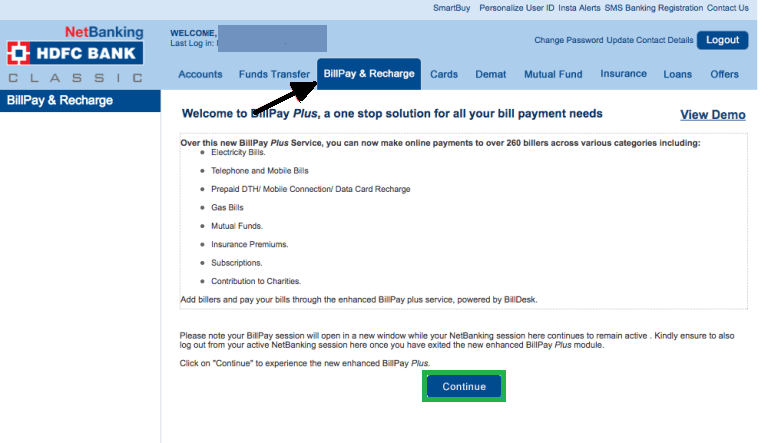
Log in to your HDFC Net Banking account and navigate to the BillPay & Recharge tab.
Once inside, select the option to Add New Biller. On the next screen, choose:
- Category: Mutual Funds
- Biller: BSE Limited
After selecting the biller, click on Continue.
You will now be required to enter your URN and verify other details.
Once the details are entered, click on Continue again. After successful confirmation, the biller gets added and your SIP payments will be automatically processed.
For a detailed step-by-step guide, read: How to Add Biller for SIP Transactions in HDFC Bank?
Biller Addition Process in State Bank of India (SBI)
For SBI, the process is slightly structured but easy to follow.
Log in to your SBI Net Banking account and click on the Bill Payments option available on the home screen.
Next, click on Manage Biller, which is usually located on the left side of the screen.
Under this section, select the Add option and choose All India Billers.
From the list of billers, select BSE Limited and click on Go.
On the next screen, enter your URN and any other required details.
After entering the details, click on Submit. Once submitted, the biller gets added successfully, and your SIP payments will be automated.
For a detailed step-by-step guide, read: How to Add Biller for SIP Transactions in SBI?
Biller Addition Process in Union Bank of India
For Union Bank of India, the process of adding a biller for SIP transactions is simple, but it is important to follow each step carefully to ensure smooth automation.
First, log in to your Union Bank Net Banking account.
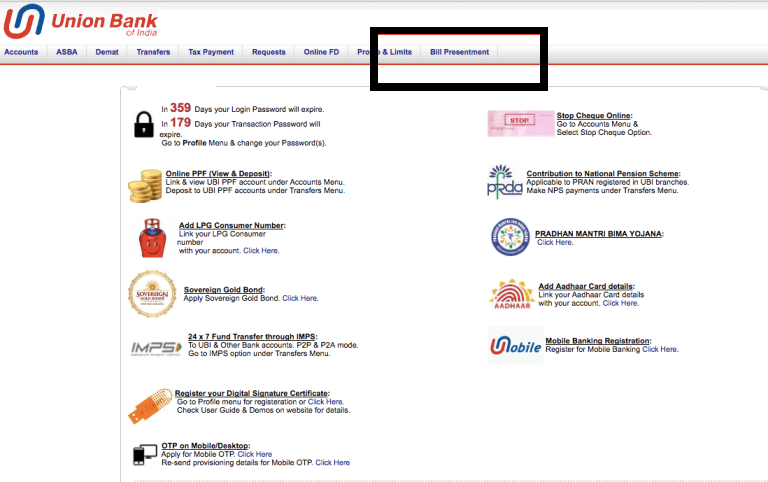
Once you are on the home screen, click on the Bill Presentment option.
Under this section, navigate to My Billers and select Add Billers / Instant Pay.
On the next screen:
- Select Mutual Funds as the category
- Choose BSE Limited as the biller
Proceed further and enter your URN (Unique Registration Number) along with any required details.
After entering the details, click on Register.
A summary page will appear where you should verify all the information carefully. Once verified, click on Confirm.
After confirmation, the biller will be successfully added, enabling automatic SIP payments.
For a detailed step-by-step guide, read: [How to Add Biller for SIP Transactions in Union Bank of India?(https://www.fincash.com/l/guide/add-biller-sip-transaction-union-bank-of-india)
Biller Addition Process in Yes Bank
To add a SIP biller in Yes Bank, start by logging in to your Net Banking account.
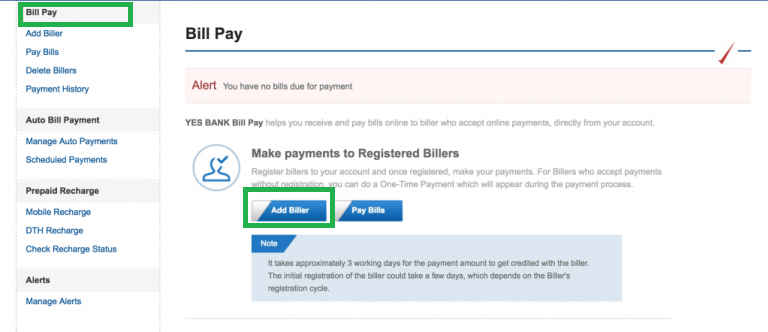
On the home screen, click on the Bill Pay option.
Next, select Add Biller. In the new screen:
- Choose National under Biller Location
- Select BSE Limited as the biller
Proceed to the next step where you will enter your URN and other relevant details.
After entering the details, click on Continue.
A summary page will appear where you can review your details. Once verified, click on Confirm to complete the process.
For a detailed step-by-step guide, read: How to Add Biller for SIP Transactions in Yes Bank?
Biller Addition Process in Kotak Mahindra Bank
In Kotak Mahindra Bank, the process is quick and user-friendly.
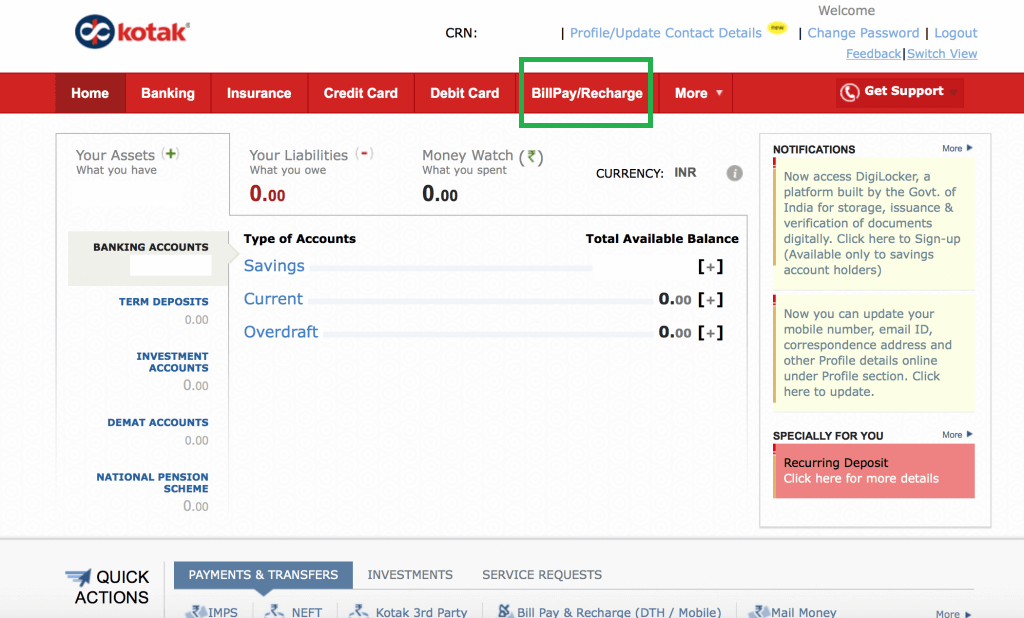
Log in to your Net Banking account and navigate to BillPay/Recharge.
Click on the option Add a Biller.
On the next screen:
- Select Mutual Funds as the category
- Choose BSE Limited as the biller
Click on Continue, and you will be prompted to enter your URN and other details.
After entering the details, click on Add Biller.
A summary screen will appear where you can verify the details. Click on Confirm to complete the process.
For a detailed step-by-step guide, read: How to Add Biller for SIP Transactions in Kotak Mahindra Bank?
Biller Addition Process in IDFC Bank
For IDFC FIRST Bank, the process includes setting up autopay along with biller registration.
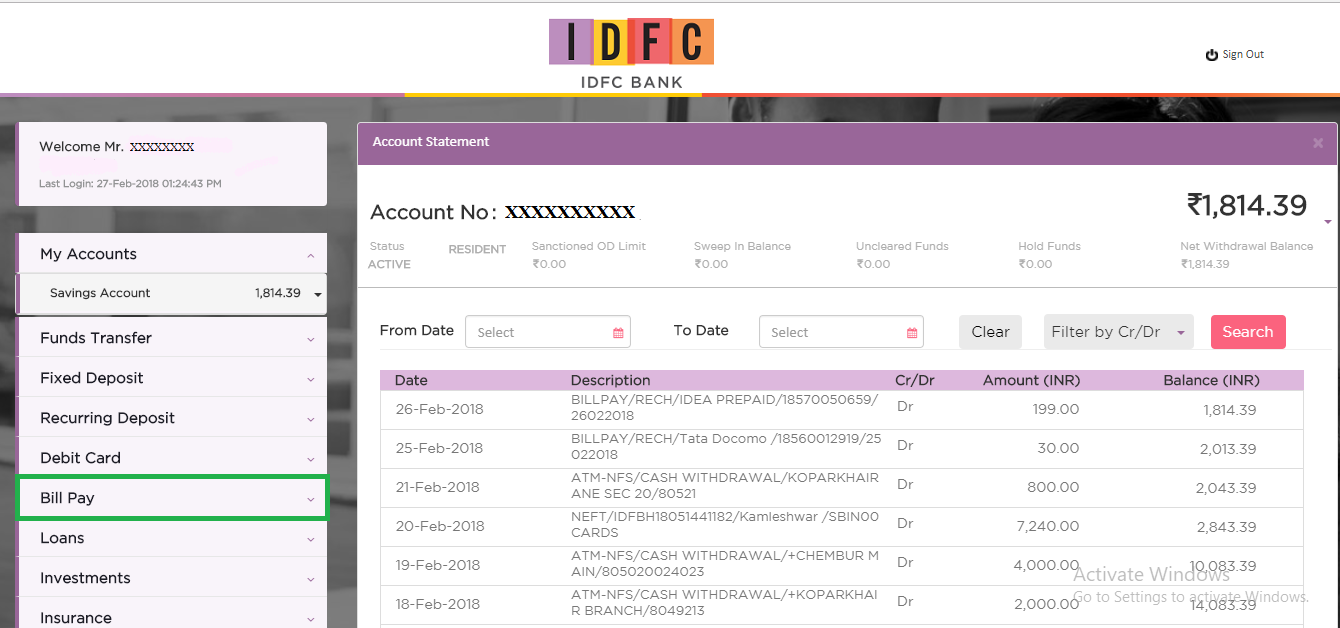
Log in to your Net Banking account and go to the Bill Pay section.
Click on Add Biller.
Enter your URN and select the appropriate category and provider (Mutual Funds → BSE Limited).
Next, enable the Auto Pay option.
You will be asked to select:
- Account number
- SIP start date
After entering the details, click on Add Biller.
Finally, verify the process using OTP. Once completed, your SIP biller will be successfully added.
For a detailed step-by-step guide, read: How to Add Biller for SIP Transactions in IDFC Bank?
Biller Addition Process in IndusInd Bank
In IndusInd Bank, the process involves two steps: adding the biller and activating autopay.
First, log in to your Net Banking account and go to the Bill Payments tab.
Click on Manage Biller and then select Add Biller.
Choose:
- Category: Mutual Funds
- Biller: BSE Limited
Enter your URN and click on Register.
After registration, verify the details and click on Confirm.
Next, go to the Schedule Payments section and select Edit Payments.
Find the added SIP biller and click on Set.
In the AutoPay screen:
- Select Pay Entire Bill Amount
- Choose payment mode as Net Banking
- Select your account
Verify and confirm the details to activate AutoPay.
For a detailed step-by-step guide, read: How to Add Biller for SIP Transactions in IndusInd Bank?
Biller Addition Process in Punjab National Bank (PNB)
In PNB, the process is usually completed through mobile banking.
Open the PNB mobile application and log in using your credentials.
On the home screen, go to Payments/Recharge and select Register Biller.
Choose:
- Category: Mutual Fund
- Biller: BSE Limited
Enter your URN and assign a nickname.
Proceed to set up AutoPay and verify using OTP.
Once completed, your SIP biller will be successfully registered.
For a detailed step-by-step guide, read: How to Add Biller for SIP Transactions in Punjab National Bank?
Biller Addition Process in Bank of India (BOI)
For Bank of India, the biller addition process can be done through Net Banking.
First, log in to your BOI Net Banking account.
Navigate to the Bill Payments / BillPay Services section.
Click on Add Biller.
On the next screen:
- Select Mutual Funds as the category
- Choose BSE Limited as the biller
Proceed further and enter your URN (Unique Registration Number) along with the required details.
After entering the details, verify them carefully and click on Confirm.
You may receive an OTP on your registered mobile number for verification.
Once verified, the biller will be successfully added. You can then enable Auto Debit / Standing Instruction to ensure that your SIP payments are processed automatically.
Fund Selection Methodology used to find 5 funds
Best SIPs to Invest to Earn Better Returns
Here are some of the recommend SIPs as per 5 year returns and AUM of more than INR 500 Cr:
| Fund | NAV | Net Assets (Cr) | Min SIP Investment | 3 MO (%) | 6 MO (%) | 1 YR (%) | 3 YR (%) | 5 YR (%) | 2025 (%) | |
|---|---|---|---|---|---|---|---|---|---|---|
| DSP World Gold Fund Growth | ₹57.6412 ↓ -0.10 | ₹1,828 | 500 | 11 | -3.3 | 28 | 57.6 | 29.2 | 167.1 | |
| SBI Gold Fund Growth | ₹42.7808 ↓ -0.02 | ₹17,647 | 500 | 1.6 | -1.3 | 22.3 | 35.8 | 24.4 | 71.5 | |
| HDFC Gold Fund Growth | ₹43.6138 ↓ -0.04 | ₹12,359 | 300 | 1.5 | -1.2 | 22.2 | 35.5 | 24.3 | 71.3 | |
| ICICI Prudential Regular Gold Savings Fund Growth | ₹45.1834 ↓ -0.05 | ₹7,149 | 100 | 1.5 | -1.4 | 22.2 | 35.6 | 24.3 | 72 | |
| Invesco India Gold Fund Growth | ₹41.1069 ↓ 0.00 | ₹511 | 500 | 2.1 | -0.7 | 20.5 | 35.2 | 24.2 | 69.6 | |
| Note: Returns up to 1 year are on absolute basis & more than 1 year are on CAGR basis. as on 5 Oct 26 | ||||||||||
Research Highlights & Commentary of 5 Funds showcased
| Commentary | DSP World Gold Fund | SBI Gold Fund | HDFC Gold Fund | ICICI Prudential Regular Gold Savings Fund | Invesco India Gold Fund |
|---|---|---|---|---|---|
| Point 1 | Bottom quartile AUM (₹1,828 Cr). | Highest AUM (₹17,647 Cr). | Upper mid AUM (₹12,359 Cr). | Lower mid AUM (₹7,149 Cr). | Bottom quartile AUM (₹511 Cr). |
| Point 2 | Oldest track record among peers (19 yrs). | Established history (15+ yrs). | Established history (14+ yrs). | Established history (15+ yrs). | Established history (14+ yrs). |
| Point 3 | Top rated. | Rating: 2★ (lower mid). | Rating: 1★ (bottom quartile). | Rating: 1★ (bottom quartile). | Rating: 3★ (upper mid). |
| Point 4 | Risk profile: High. | Risk profile: Moderately High. | Risk profile: Moderately High. | Risk profile: Moderately High. | Risk profile: Moderately High. |
| Point 5 | 5Y return: 29.24% (top quartile). | 5Y return: 24.40% (upper mid). | 5Y return: 24.26% (lower mid). | 5Y return: 24.26% (bottom quartile). | 5Y return: 24.25% (bottom quartile). |
| Point 6 | 3Y return: 57.64% (top quartile). | 3Y return: 35.82% (upper mid). | 3Y return: 35.54% (bottom quartile). | 3Y return: 35.64% (lower mid). | 3Y return: 35.19% (bottom quartile). |
| Point 7 | 1Y return: 28.05% (top quartile). | 1Y return: 22.35% (upper mid). | 1Y return: 22.15% (bottom quartile). | 1Y return: 22.23% (lower mid). | 1Y return: 20.47% (bottom quartile). |
| Point 8 | Alpha: 4.18 (top quartile). | 1M return: -4.50% (lower mid). | 1M return: -4.48% (upper mid). | 1M return: -4.56% (bottom quartile). | 1M return: -4.14% (top quartile). |
| Point 9 | Sharpe: 1.25 (bottom quartile). | Alpha: 0.00 (upper mid). | Alpha: 0.00 (lower mid). | Alpha: 0.00 (bottom quartile). | Alpha: 0.00 (bottom quartile). |
| Point 10 | Information ratio: -1.01 (bottom quartile). | Sharpe: 1.38 (upper mid). | Sharpe: 1.38 (lower mid). | Sharpe: 1.30 (bottom quartile). | Sharpe: 1.38 (top quartile). |
DSP World Gold Fund
- Bottom quartile AUM (₹1,828 Cr).
- Oldest track record among peers (19 yrs).
- Top rated.
- Risk profile: High.
- 5Y return: 29.24% (top quartile).
- 3Y return: 57.64% (top quartile).
- 1Y return: 28.05% (top quartile).
- Alpha: 4.18 (top quartile).
- Sharpe: 1.25 (bottom quartile).
- Information ratio: -1.01 (bottom quartile).
SBI Gold Fund
- Highest AUM (₹17,647 Cr).
- Established history (15+ yrs).
- Rating: 2★ (lower mid).
- Risk profile: Moderately High.
- 5Y return: 24.40% (upper mid).
- 3Y return: 35.82% (upper mid).
- 1Y return: 22.35% (upper mid).
- 1M return: -4.50% (lower mid).
- Alpha: 0.00 (upper mid).
- Sharpe: 1.38 (upper mid).
HDFC Gold Fund
- Upper mid AUM (₹12,359 Cr).
- Established history (14+ yrs).
- Rating: 1★ (bottom quartile).
- Risk profile: Moderately High.
- 5Y return: 24.26% (lower mid).
- 3Y return: 35.54% (bottom quartile).
- 1Y return: 22.15% (bottom quartile).
- 1M return: -4.48% (upper mid).
- Alpha: 0.00 (lower mid).
- Sharpe: 1.38 (lower mid).
ICICI Prudential Regular Gold Savings Fund
- Lower mid AUM (₹7,149 Cr).
- Established history (15+ yrs).
- Rating: 1★ (bottom quartile).
- Risk profile: Moderately High.
- 5Y return: 24.26% (bottom quartile).
- 3Y return: 35.64% (lower mid).
- 1Y return: 22.23% (lower mid).
- 1M return: -4.56% (bottom quartile).
- Alpha: 0.00 (bottom quartile).
- Sharpe: 1.30 (bottom quartile).
Invesco India Gold Fund
- Bottom quartile AUM (₹511 Cr).
- Established history (14+ yrs).
- Rating: 3★ (upper mid).
- Risk profile: Moderately High.
- 5Y return: 24.25% (bottom quartile).
- 3Y return: 35.19% (bottom quartile).
- 1Y return: 20.47% (bottom quartile).
- 1M return: -4.14% (top quartile).
- Alpha: 0.00 (bottom quartile).
- Sharpe: 1.38 (top quartile).
All efforts have been made to ensure the information provided here is accurate. However, no guarantees are made regarding correctness of data. Please verify with scheme information document before making any investment.




AMFI Registration No. 112358 | CIN: U74999MH2016PTC282153
Shepard Technologies Pvt. Ltd. (with ARN code 112358) makes no warranties or representations, express or implied, on products offered through the platform. It accepts no liability for any damages or losses, however caused, in connection with the use of, or on the reliance of its product or related services. Terms and conditions of the website are applicable.
©2026 Shepard Technologies Private Limited. All Rights Reserved
hi, how to add a SIP URN in Fedral Bank aacound... kindly help me out balaji
How to add biller for SIP transaction for Federal bank?